
Your command center for child AI safety
Complete visibility and full control over your child's AI experience — monitor conversations, customize parental controls, and receive real-time safety alerts from one intuitive dashboard.
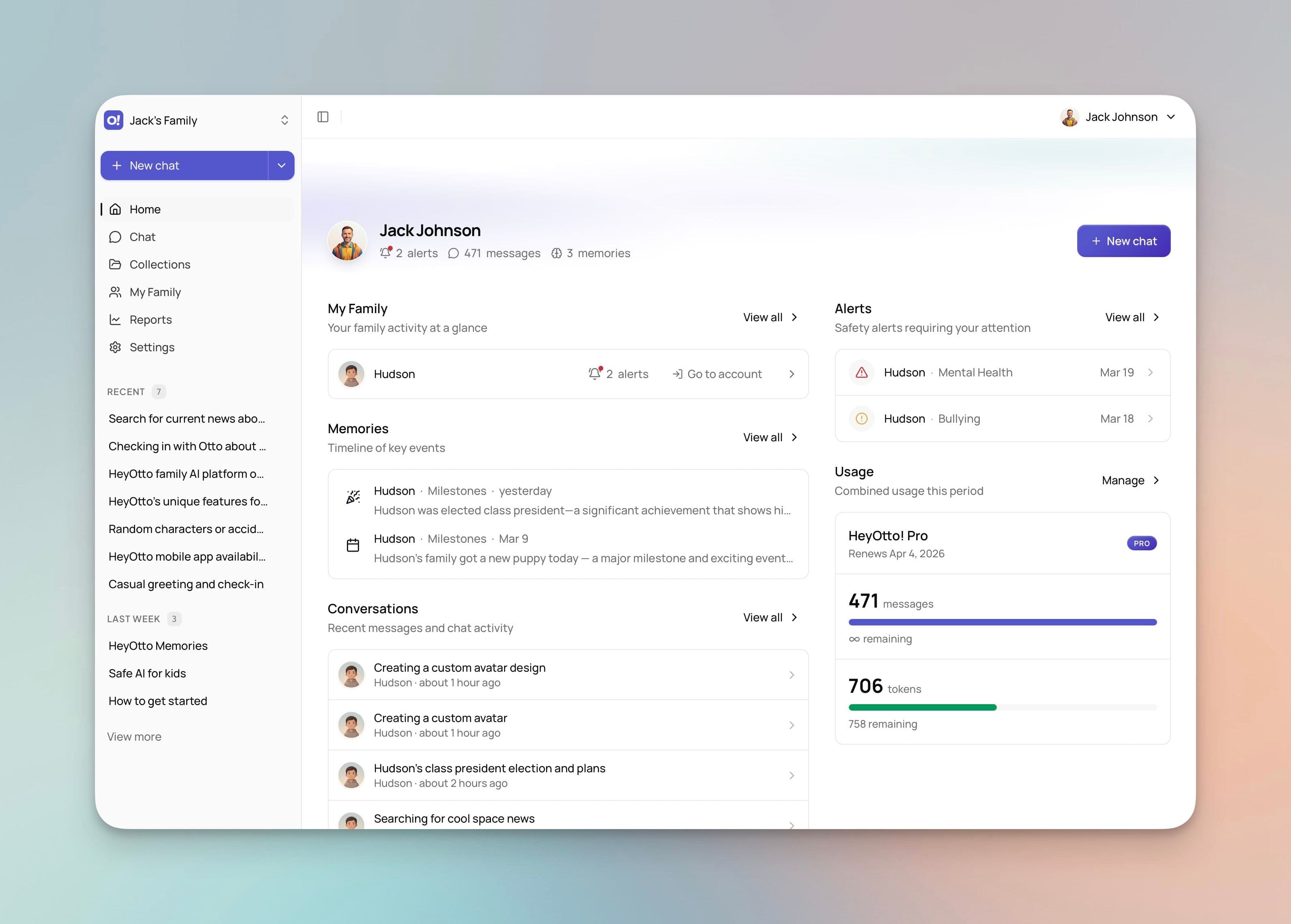
Key Benefits
Conversation History
Access complete chat transcripts with timestamps and search functionality. Review specific conversations and flag anything that needs a closer look. Never wonder what your child talked about.
Smart Safety Alerts
Receive email and push notifications when Otto detects concerning patterns, inappropriate requests, or when your child tries to access restricted topics. You choose the alert sensitivity level.
Topic Blocking & Content Filtering
Block specific topics completely — relationships, politics, adult content, and more. Otto automatically redirects conversations away from restricted subjects without your child knowing why.
Usage Analytics
Weekly and monthly reports show how much time each child spends with Otto, what topics they explore most, and how their interests evolve. Spot patterns early and respond with confidence.
Time Management Controls
Set daily or weekly usage limits, schedule available access hours (school days: 3–8pm only), and maintain healthy screen time habits with automated enforcement — no nagging required.
Per-Child Profiles
Create unique profiles for each child with age-adaptive settings, personality traits, learning goals, and individual restrictions. Each child's Otto experience is entirely their own.
Parental controls
Your family, your rules.
Powerful customization that lets you tailor every aspect of your child's AI experience — without needing to be a tech expert.
Age-Adaptive Content
Set your child's age and Otto automatically adjusts vocabulary, topic complexity, and content access as they grow — from ages 8 through 18.
Topic Restrictions
Block and redirect specific topics completely. Dating, politics, violence, religion — you decide what's accessible, with granular per-child controls.
Usage Limits & Schedules
Daily and weekly time caps, access windows (after school only, weekends only), and break reminders that enforce healthy AI habits automatically.
Personality & Interests
Add traits, hobbies, and goals to each child's profile so Otto personalizes every response — making conversations more relevant and engaging.
Family Values
Set religious preferences, cultural context, dietary awareness, and behavioral expectations so Otto respects what your family stands for.
Learning Goals & Progress
Define subject interests, educational focus areas, and skill goals. Track conversation history, achievements, and usage statistics over time.
Real scenarios
How parents use the dashboard every day
Not hypothetical. Here's how the parent dashboard fits into the real moments of family life.
Staying Connected to Your Child's Interests
“My 9-year-old suddenly loves space. What is she asking Otto about?”
- 1.Check this week's activity summary in the dashboard
- 2.See she's deep into Apollo 11 and black holes
- 3.Add astronomy to her learning profile in one click
- 4.More space content surfaces automatically
Stay close to what matters — without invading privacy
Responding to a Safety Alert
“I got an alert — what did my child ask about?”
- 1.Tap the alert notification on your phone
- 2.Review the flagged conversation with context
- 3.Decide to block the topic or adjust alert sensitivity
- 4.Changes take effect in your child's next session
Act fast when it matters — never be left in the dark
Adjusting Settings as They Grow
“My child just turned 13 — time to update her profile.”
- 1.Update her age and content level in profile settings
- 2.Review which topic blocks still make sense
- 3.Extend daily time limits for a teenager
- 4.All changes apply instantly to her experience
Parenting decisions that flex with real life
Setting Up a New Child Profile
“My younger child just started using Otto — how do I set it up right?”
- 1.Create a new profile with their age and gender
- 2.Add interests, personality traits, and learning goals
- 3.Set topic restrictions and usage schedule
- 4.Otto is personalized and ready in minutes
Set it up once — Otto handles the rest
One platform, two worlds
Your experience is entirely different
The parent dashboard and your child's Otto are powered by the same intelligence — designed for completely different needs.
Safe. Age-adaptive. Actually fun.
Filtered, monitored, and tuned to their age — every response shaped by the guardrails you set.
- Age-appropriate content filters active at all times
- Guided by your family values and preferences
- Creative tools — images, stories, homework help — with safety baked in
- No ads, no emotional manipulation, no dark patterns
- Every conversation fully visible to you
Full-powered. Completely yours.
A completely separate space built for the real questions only a parent asks — with no limits.
- No content filters on your conversations with Otto
- Full visibility into every child's activity and conversations
- Profile management, setting changes — without leaving chat
- Parenting advice grounded in your family's actual situation
- Your conversations are completely private from your children
Yes. HeyOtto's parental controls let you block any topic completely — dating, relationships, politics, violence, adult content, and more. Otto will automatically redirect conversations away from restricted subjects. You can configure different topic restrictions for each child based on their age and your family's values.
Your parent account can manage multiple child profiles from one login. The Pro plan includes 1 adult + 1 child. Additional users are $5/month each. Each child has their own age-adaptive settings, conversation history, and safety boundaries.
HeyOtto is built with COPPA compliance at its core. We require verifiable parental consent before any child under 13 can use the platform, we do not collect unnecessary personal information, and parents have full control over their child's data at all times. We are currently in the process of acquiring our official compliance certifications. You can review our full privacy practices in our Privacy Policy.
Yes. Your parent dashboard provides full access to all conversations in real-time. You can review chat history, see activity summaries, and receive notifications about your child's interactions with Otto.
Related reading
Start protecting your family today
Parents create the account. Try free — 100 messages/month, no credit card.